

Before this UI Update, the Player’s health was displayed in the bottom left with a coloured square, which changed from green-yellow-red, So I was tasked with creating a proper UI for the Player, Meaning a Health Bar, Stamina Bar and an indicator for the cooldown of the growl/screech.
So I got to designing them, And it was pretty easy to think of an idea, Health bars are usually red, Stamina is usually Blue, Green or sometimes Yellow, and the Growl Cooldown shaped the UI because the idea was for the cooldown to be a picture of the Raccoon’s face, which went grey when you couldn’t growl.
After deciding these things, I started designing, I started with the Raccoon Face, I originally wanted to make it look like a circle, but I couldn’t figure out how to do that so the best alternative I had was an Oval shape, after I got this Shape, I started designing the Bars, And I thought it would be a good idea to have each bar connected to the Raccoon Face, with 1 Bar above and 1 Bar below, so then I ended up actually shaping the Bars around the Oval, which took some Warping work, But then I finished!
After I finished, I had more work to do, I had to create the empty versions of them all, So the versions that would indicate loss of Health, Stamina or the inability to use the Growl, So I had to darken and slightly fade the colours of the Stamina Bars and I had to change the Raccoon Face to a grey image, which is basically the same as Darkening and Fading but with the addition of subtraction of colour.
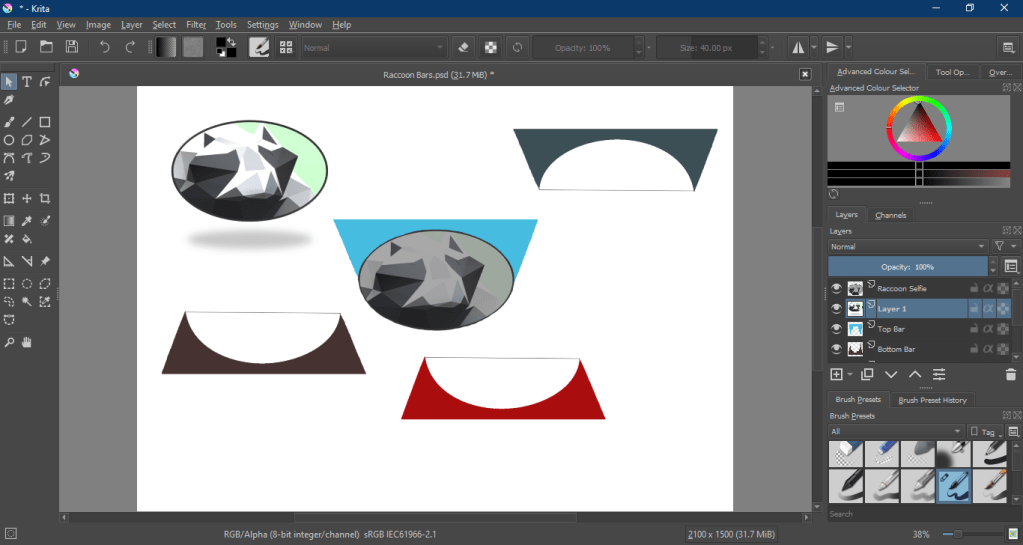
This is what I ended up with.
I then had to save each image individually, then figure out how to implement them into the game and make them functional.
This required me to scour YouTube for a tutorial, I then found a tutorial, and proceeded to find the process quite easy. The hard part was integrating it into the existing code, As I had to understand what any/all of the code in the Raccoon does, with only a basic knowledge of C#, But I did manage to do it, It only took around 3-4 hours in total.

Originally the Growl Cooldown was meant to just turn grey and light back up when you could growl again, But I ended up making it another Bar that goes in a circle to let you know how long you have left until you can growl again.
I then created a video tutorial on how to implement the UI into the game, which was needed because I did not have the main version of the game, there is no collaboration mechanic with Unity, and if there is, we are unaware of and not using it, So the video was needed to help the team member with the main version, implement it.
 Raccoon Game