A Big Update

Over the past several weeks, I have been working on a massive overhaul of everything within the Raccoon Game – so much so, that simply writing it all out wouldn’t do it justice – so, here is a video, showing the gameplay so far, within a minigame

This, obviously, isn’t the puzzle game I set out to design – however, a simple food collection minigame has helped the development of both myself, and the game, in several ways.

First of all, it has given me the ability to test multiple aspects of the game – from the more obvious things, such as item collection and npcs, to the things you might not think about – edits to the movement and camera scripts, for example

It has also allowed me to create a fun, finished product, while waiting on other team members to create the necessary pieces for me to continue onto the main game.

Now that that’s out of the way, you may be wanting a breakdown of what all has changed since my last update; while the above is a good overview, below will be an in-depth analysis of everything I have done for this game!

Movement:

First of all, I completely redid the movement script – changing from a badly constructed script, to the standard assets pack script – before fully rewriting my original movement script. I did this, because my first script was buggy, difficult to read, and often unreliable. The standard assets script also had many faults, and relied on many things that I either removed or repurposed – as such, a new script was necessary. My new script is far cleaner, and more reliable, than any of my previous ones.

On top of accounting for everything from walking, to jumping, to sprinting, the script also contains handlers for various other features – including the ‘scream’ you hear in the video, used to warn off enemies.

Camera:

Much like the movement script, the camera script has also gone through many changes – starting with one I found online, moving to the standard asset pack third person camera, before being completely rewritten for purpose.
The original camera script I chose was functional, but not without its bugs; the standard asset pack script was very useful, but overcomplicated, and had many bugs – the worst of which included flipping the camera around every time the player jumped – which could make it difficult to navigate mid-air.

The new camera script is cleaner, far shorter, and very easy to understand – its simplicity makes it easy to fix and edit, and ensures that its reliable.

Getting to this point was extremely complicated, and included a lot of trial and error…

…A lot of trial and error.

NPCs:

The games NPCs were one of the most complicated, but most useful, elements I managed to create; while they can, at times, behave unpredictably, they work the majority of the time, and the errors now are, thankfully, insignificant.

I created the NPCs using Unitys NavMesh functions – building a NavMesh from my game world, and making each of the NPCs Agents of that Navmesh. I used the standard asset pack NPC controller as a base, and built my own AI controller script – changing its targets based on different situations.

The majority of the time, the NPCs positions are randomized from multiple possible positions – once a certain amount of time passes, their position is randomized again, causing them to wander around the ‘park’.
If they spot the player, they will give chase – and, if they reach the player, they will kick them away – dealing damage, and throwing them a distance.
If they player continues to run, they will eventually lose interest, and return to wandering.

The player also has one more choice – they can press E, to screech at the humans – startling all humans in their radius, causing them to run away for a time – though this, again, wears off.

Pick-Up Items:

Pick-up items are another addition to the game – using the mouse, the player can click on pick-up items, which the racoon will then hold in their mouth. Upon letting go of the mouse, the racoon will drop the item. As such, they can only carry one food item at a time

Points:

With pick up items, they player needed something to do with them – this is where the point system comes in! In this minigame, the player must throw away the food items – gaining points based on how big the item is

Spawning Objects:

In order for the game to continue, I needed to spawn objects – currently, all food objects spawn randomly, and fall from the sky. This uses a simple instantiate script attached to a spawner, which would randomize a position, and spawn a random food item, after a random cool down – the enemies are spawned according to a very similar script

Animation and sound:

Next, I needed to make the game look a little better – using animations! I started by making some animations using Blender; I used blender, as I had some experience using this program from last year. I made animations for walking, running and jumping, and plan on making more animations in the future. I’ve thus far managed to make the animations work for the player – walking and jumping animations triggered in the movement script for each action

I used the same strategy for the sounds – I took some royalty-free sounds off of sound library SoundBible, and cut and stitched them together using Adobe Premiere, as this is a program I have lots of experience with. After this, I exported each sound as MP4, and placed them into my game files – using those clips and various audio sources, triggering them in the movement script in response to each relevant action.

A reflection on progress

I am currently continuing to work on the game – and will be uploading a video later today, to show my progress and explain where I am in the development process now. I’ve made a lot of progress in that regard – but, that isn’t what this is for. This is to outline all of the other progress I’ve been making, outside of pure game progress.

First of all, I’ve been doing some work in blender – mostly animation work. On top of the animation I’ve already shown here before (the racoon), I have also animated a walk cycle for the human, and some basic animations for on the title screen

I’ve been using Blender, as this is the program being used to make the models in the first instance – and, this is the program I am most familiar with in terms of animation, having used it last year. It uses keyframes, which can be assigned quickly and easily – and the animation is easy to play back and edit as necessary.

I am currently working on bringing these animations into Unity, but, am still working on making progress in that regard – I don’t yet know how to trigger animations at the correct times, but, am doing research into that to bring in soon – I feel like it will greatly improve the feel of the game

I am also using Photoshop at points, in order to create UI elements, or other 2D images for the game. I am using Photoshop, as this is the industry standard art program, and, as such, it is important that I become familiar with it – when I work at home, however, I use Painttool SAI, which is more artist-oriented. Both programs work well for what I need, and allow me to make the pieces that I need.

Overall, I have been making great progress, and only plan to continue to do so

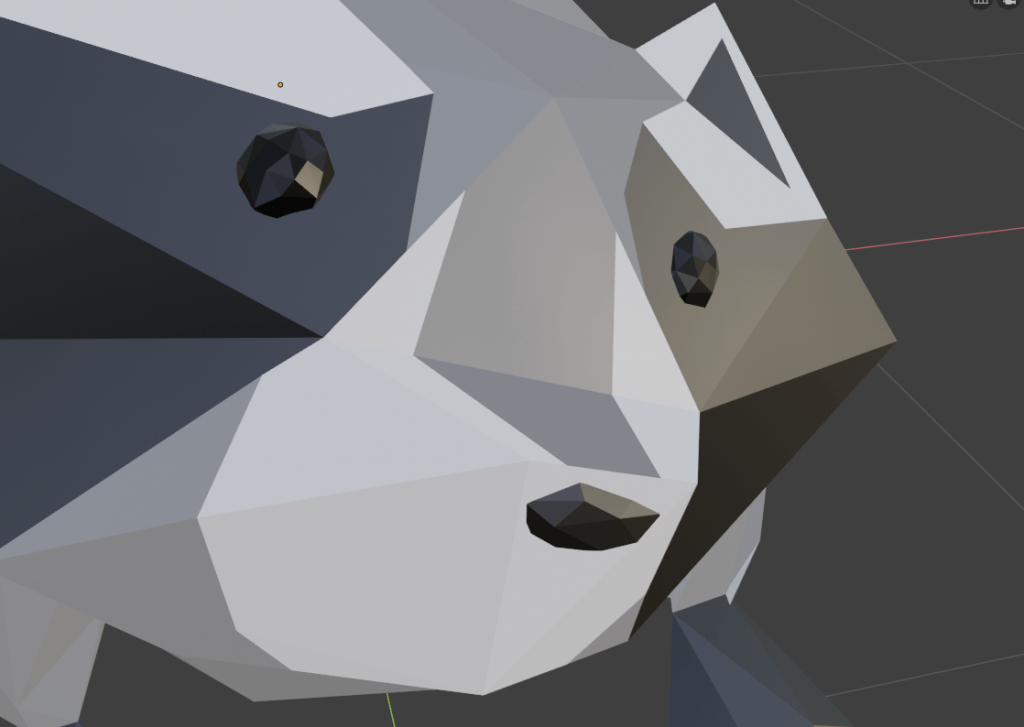
raccoon model (test?)

i wanted to test if the style we wanted for the game would work in 3D, and i wanted to test my blender skills some more. so i made a raccoon model! for now its just a test until we decide on permanent assets.

first, i sculpted a basic shape in zbrush, then re-topologized that and imported it into blender. i lowered the poly count as much as i could without destroying the whole shape (which was just under 900 polys or so) and added eyes and a nose.

then, i textured the model using the material editor in blender, and the knife tool to get the shape i wanted. this allowed me to colour different faces with different materials, so i could get a good texture without having to use any uv editing. this also allowed me to easily make shiny eyes (made a black material with loads of specular and metallic effect, and no roughness.)

next came the rigging! this one took me a while to figure out, as after i created the initial armature, i had an issue where the eyes and nose didn’t interact properly with the mesh and the armature. i eventually fixed this but merging the eyes + nose with the initial mesh, and creating armature after that. i also edited the armature slightly.

and, voila! this is my finished test model so far, and an idea of the art direction for the models in game.

– ellie

level idea

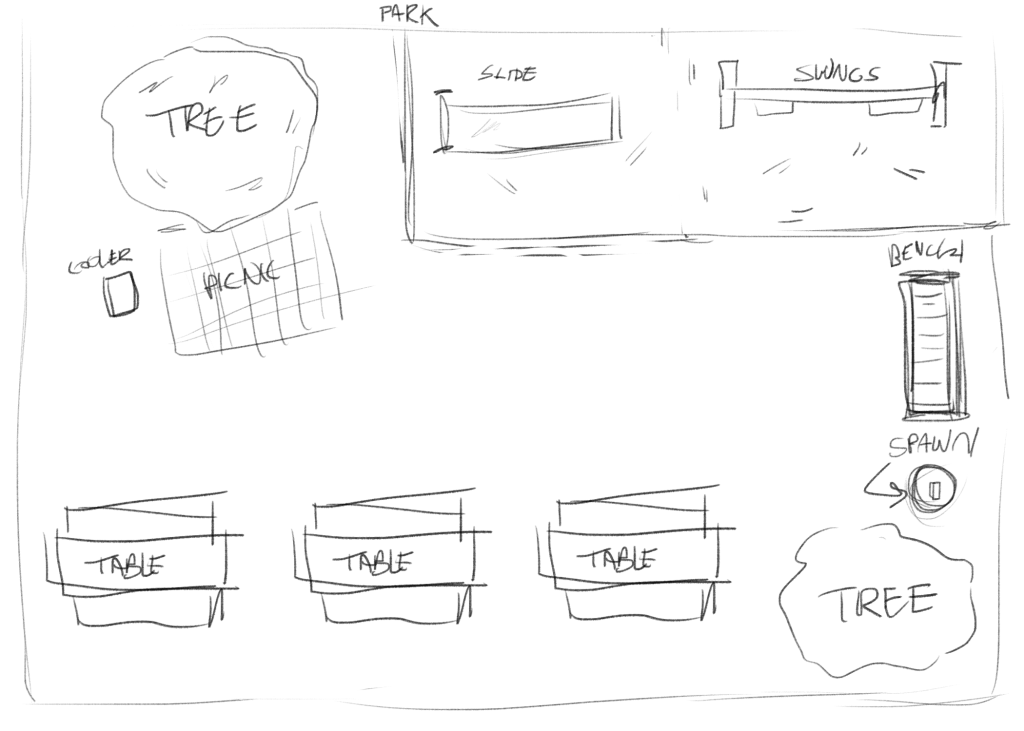
brainstorming ideas for potential levels! here’s an example sketch (i’ll walk you through my though process here)

the idea is for a park. the raccoon (player) would spawn from the bin next to the bench. there’s two trees which can be climbed and perched upon, a usable slide and swings. a cooler with food inside that can be dragged around. picnic tables with food and other items (soup flasks, phones, etc.) the bench and tables are climbable.
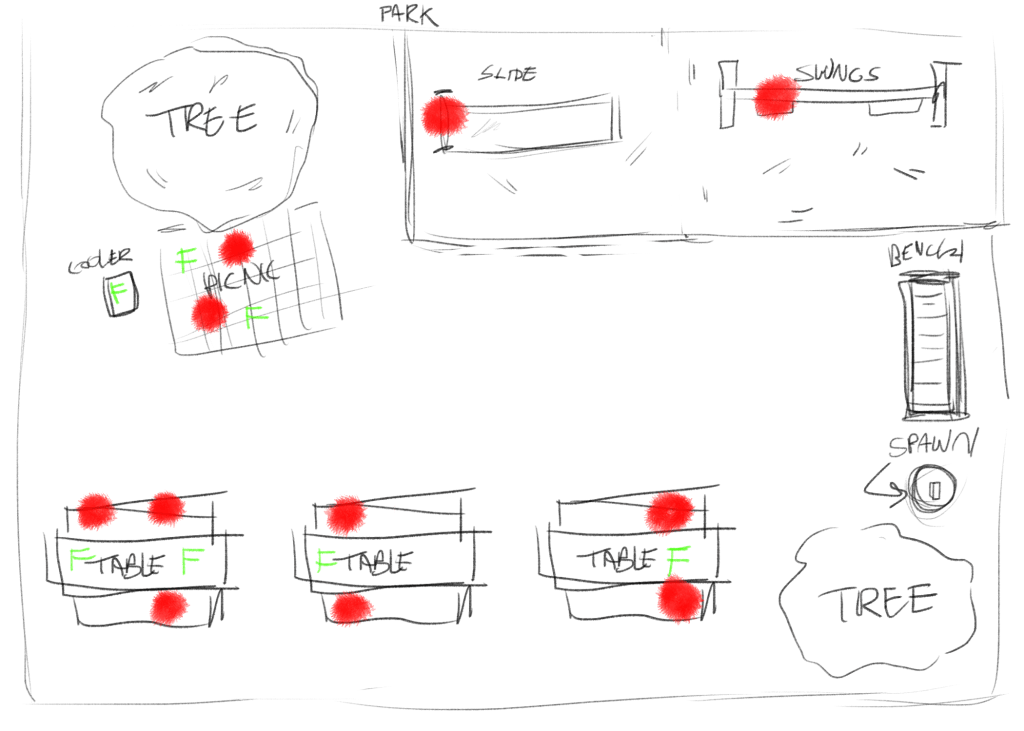
these red dots represent people. there would be children npcs and adult npcs. they’d each have one of the behavior types documented earlier, and there would be a mix of children and adults. generally, they would stick to their default places, but would move around depending on interaction with the player.
the green Fs show food. food would be an important item in the game, and many tasks would center around the collection/theft of food. there would be a number of tasks each level, for example;
– have a picnic (would require player to scare off people at picnic blanket and then sit on it)
– ruin everyone’s lunch (steal all the food on the level and place it in bin.
– have fun on the slide (scare off child on slide, climb it, then go down the slide)
– have fun on the swings (same as above, except by pressing the movement keys back and forth perhaps you could swing?)
– reenact the discovery of gravity (lure a human to under a tree, and drop an apple on them)

these are all examples and concepts, and need to be further developed, but give a general gist of the total plan.

– ellie

Gameplay Ideas

Even though it is early on, basic gameplay ideas have already been discussed. Obviously, everything here is subject to change, based on time constraints, our abilities, and how the gameplay actually works out later – but, these are our basic ideas so far!

Controls:

Movement – WASD
Jump – Space
Run – Shift
Pick up/Use – E
Growl – Left click
Toggle two legs/four legs – Right click
Check tasks – TAB
Pause – Esc

General Gameplay:

Picking up items

As the raccoon, you must pick up items to do various things – be it items you need to collect, or items you can use to get what you want. Approaching an item not held by another character and pressing ‘E’ will allow you to pick it up. If you are walking on all fours, you may only carry one item – in your mouth – but, if walking on two legs, you may carry up to three small items – or one larger one. If you are carrying items, you can no longer growl without dropping the item first.

Some items will be usable – either to build primitive devices, to get to new areas, or to scare off anyone that may interfere with your dastardly plans.

If collecting an item to meet objectives – or wanting to put something out of the way – the item must be placed in a bin.

Walking on two legs

As the raccoon, you will have the option of walking on either two or four legs.

Walking on four legs allows you to run and climb – though, you can only carry one small item

Walking on two legs allows you to carry up to three items – though, you only walk slowly, and you cannot climb

Humans

When it comes to humans, there are several ‘personality types’ the raccoon will meet:

The coward;

This is the least interrupting of the personality types – if they see you, or hear you growl, they run away or cower. May alert other npcs to your presence.

The ‘doesnt care’;

This human just doesnt care. You dont threaten them, and they wont react if you growl. May get in the way. If they see you with an item, they will try to take it off of you

The brute;

Will ruin your day. Chases and hits/swats you so the raccoon drops all held items and is knocked back a few spaces. 

Growling will cause the brute to pause for a moment, before continuing their chase. Once they have hit you, they will leave you alone and return to what they were doing and will take whatever items may have been taken from them.

The animal lover;

This human never learnt to respect nature; they think youre cute, and want you to know. Growling at this human will cause them to back off a moment, before continuing their chase. They will continue to look for you, even if they catch you once

When caught, this human will hold on to you – you must click the growl button really quickly to break free

welcome to raccoon… 2!

hi!

originally, when given a project brief about an untitled goose game-inspired mischief game, I immediately thought about raccoons. little hands and a penchant for mischief makes for a fun idea! the direction I hope this project goes to is a ways similar to untitled goose, but with its own raccoon spin to make it separate enough to be somewhat standalone. we’re aiming for a number of unique mechanics that make use of the raccoons particular skillset, like their little hands and climbing skills.

overall, making a fun raccoon experience is top priority for this project, and its still very early in development, so the details are subject to change.

happy raccooning!

-ellie

Welcom to Raccoon

First things first – welcome to our blog! Whether you’re here because you like games, raccoons – or you’re grading us for our qualification (hi!), we thank you for checking us out! Your interest is certainly appreciated, and, we’re glad we caught your eye!

Raccoon Game will be a game inspired by Untitled Goose – in which you play as a raccoon, and cause all the chaos possible when you have tiny little hands and a healthy appetite for mischief.

Of course, its very early days at current – so its hard to say how our game designing adventure will go! But, we hope you will join us on it, and follow our journey as we move forward – one paw-step at a time!

~ Amelia